
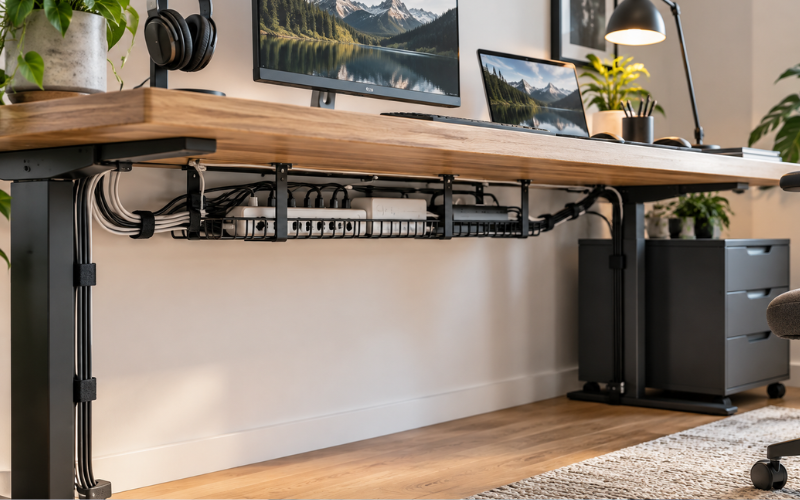
Cable management is the process of arranging, securing, hiding, and labeling the wires connected to electronic devices. It can be as simple as using a reusable strap to hold charging cables together or as detailed as installing cable trays beneath a large office desk.
Without proper organization, cables can quickly become tangled behind desks, televisions, computers, and furniture. Loose wires may collect dust, fall behind equipment, block access to ports, or create a tripping risk. It can also become difficult to identify the correct cable when a device needs to be moved or disconnected.
Good cable management creates a cleaner and more practical environment. At home, it can improve the appearance of a living room or bedroom. In an office, it can make a desk easier to use and maintain. Around entertainment systems, it allows people to reach the correct connections without sorting through a confusing bundle of wires.
An effective setup does not need to be expensive or complicated. With basic planning and a few suitable accessories, most cables can be organized safely. This article covers common cable problems, useful tools, setup methods, safety practices, and simple ways to maintain an organized space.
What Cable Management Means and Why It Matters
Cable management involves controlling where cables go and how they are held in place. Its main purpose is to prevent wires from becoming tangled, damaged, or difficult to identify. It may include grouping similar cables, attaching them to furniture, placing them inside covers, or labeling both ends.
A well-organized setup makes electronic equipment easier to use. If every cable follows a clear route, it takes less time to find the correct connection. Devices can be removed or replaced without disturbing every other wire in the area.
Appearance is another important benefit. A desk may still look untidy when several loose wires hang from its back, even if the work surface is clean. Securing those wires under the desk can create a more open and professional-looking space.
Cable management can also support safety and equipment care. A cable stretched across a walkway can cause someone to trip. A wire trapped under furniture may become crushed or damaged. Organizing cables helps reduce these problems, although it does not replace proper electrical safety practices.
Common Cable Problems in Homes and Workspaces
One of the most common problems is a tangled bundle behind a desk or television. Cables become twisted when devices are added, removed, or moved without reorganizing the existing connections. Over time, it may become almost impossible to trace a single wire from one end to the other.
Cable length can also cause difficulties. Extra-long wires may form loose loops that collect dust or catch on furniture. Short cables may be pulled tightly between devices, placing pressure on plugs and ports. Poorly positioned cables can also block drawers, chair wheels, or walking areas.
Crowded outlets and overloaded power strips require particular attention. Cable organization may improve their appearance, but it cannot make an unsafe electrical setup safe. Power strips should be used within their stated limits, and high-power appliances should follow the manufacturer’s connection instructions.
Loose charging cables create another everyday frustration. They may fall behind desks, become mixed with other chargers, or disappear when they are needed. Small desktop clips can hold these cables in an accessible position without leaving them spread across the surface.
Planning Your Cable Layout Before Getting Started
Good cable management begins with planning. Before buying organizers, look at every device, outlet, power strip, and connection in the area. Identify what each cable supports and whether it is still needed.
Disconnect equipment only when it is safe to do so. Remove unused cables and set aside old wires that no longer serve a purpose. Damaged cables should not be placed back into the setup. Replace them with suitable products made for the relevant device.
Next, measure the distance between devices and their connection points. Plan cable routes that avoid sharp edges, heat sources, doors, chair wheels, and busy walking areas. Cables should reach their ports comfortably without being pulled tight.
Consider which devices are moved regularly. A laptop charger, wired headset, or game controller may need more freedom than a television cable that rarely changes position. Avoid fastening frequently used wires so firmly that they become inconvenient.
It is also sensible to leave room for future changes. A setup that holds the current cables too tightly may need to be rebuilt when another monitor, speaker, or charging station is added.
Essential Cable Management Tools and Accessories
Different tools solve different cable problems. Reusable hook-and-loop straps work well for grouping wires because they can be opened whenever the setup changes. Plastic cable ties provide a firmer hold, but they should not be pulled so tightly that they press into the cable covering.
Cable clips and adhesive holders can guide individual wires along a desk, wall, or piece of furniture. Sleeves and spiral wraps combine several cables into one cleaner-looking bundle. Under-desk trays and baskets can hold power strips, adapters, and excess cable length away from the floor.
Cable boxes help conceal power strips and plugs, but they must have suitable openings and ventilation. Heat-producing adapters should not be packed tightly inside a closed space.
Labels and colored tags make connections easier to recognize. They are especially helpful behind computers and entertainment systems, where several cables may look similar. Floor covers can protect wires crossing certain areas, while raceways can hide cables along walls or baseboards.
Choosing the Right Cable Management Solution
Begin by considering how many cables need to be organized and how thick they are. A small clip designed for a charging wire will not hold a group of heavy power and display cables. Similarly, a large sleeve may be unnecessary for only one or two thin wires.
Decide whether the solution should be permanent or removable. Screwed-in trays and raceways can provide strong support, while adhesive clips and reusable straps are easier to remove. Renters may prefer no-drill products that are less likely to damage walls or furniture.
The installation surface also matters. Adhesive products may not attach well to dusty, uneven, damp, or textured surfaces. Clean the area first and check the instructions before applying them. Test removable adhesive on a hidden area if the finish is delicate.
For outdoor spaces, garages, or high-traffic areas, choose organizers intended for those conditions. Indoor cable sleeves may not withstand moisture, strong sunlight, or repeated foot traffic.
A practical solution should balance appearance with access. Completely hiding every wire may look attractive, but it can make repairs or equipment changes unnecessarily difficult.
A Simple Step-by-Step Cable Management Process
Start by turning off and disconnecting the equipment that can be safely unplugged. Photograph the existing connections if you may need help reconnecting them later. Sort the cables by device or purpose, and remove anything that is unused, unsuitable, or damaged.
Place the power strip in a secure and accessible location. It should stay away from feet, chair wheels, liquids, and spaces where heat may build up. Position each device before deciding on the final cable routes.
Run cables along the planned paths. When practical, avoid placing power cables directly beside sensitive data or audio cables for long distances, as electrical interference can sometimes affect performance. Do not worry if short sections must cross; the goal is a sensible and manageable layout.
Secure cable groups with reusable straps, sleeves, or suitable clips. Keep the bundles comfortably firm rather than tight. Leave a small amount of extra length near devices that may need to move.
Label important connections at both ends, particularly when several plugs look alike. Reconnect and test every device before closing cable boxes or completing permanent mounting. This step makes it easier to correct a connection while everything remains accessible.
Desk Cable Management for a Cleaner Workspace
Desk cable management works best when devices are positioned before wires are secured. Place monitors, computers, lamps, chargers, and other equipment where they will be used. This helps prevent cables from crossing unnecessarily.
An under-desk tray can hold a power strip and extra cable length. It keeps these items off the floor and makes cleaning easier. However, the tray should be securely installed and large enough to hold its contents without crowding adapters.
Use clips to guide charging cables toward accessible areas. This prevents them from falling behind the desk while keeping the work surface clear. Wires connected to a standing desk or monitor arm need enough slack to move through the full adjustment range.
Avoid routing cables where they can catch on chair wheels or be pulled by a person’s legs. A practical workspace should remain comfortable and easy to change, not simply look tidy in a photograph.
Managing Cables Around TVs and Entertainment Systems
Televisions, speakers, game consoles, streaming devices, and media players can create a large number of similar-looking cables. Start by grouping them according to the device they support. Label HDMI, power, network, and audio cables so each connection is easy to trace.
Wall-mounted raceways can conceal visible cables running between a television and a media unit. Choose a size that fits the entire bundle without forcing wires inside. Follow the equipment manufacturer’s instructions if cables are routed inside a wall, because building and electrical requirements may apply.
Keep equipment vents open and avoid pressing cables against hot surfaces. Adapters, consoles, and media players need suitable airflow. Leave enough access to remove a device without dismantling the complete setup.
Cable Management for Computers and Gaming Setups
Computers and gaming areas often contain monitor, keyboard, mouse, headset, speaker, network, and power cables. Begin by separating the wires that rarely move from those used frequently.
Fixed connections can run through an under-desk tray or sleeve. Frequently used headset, controller, and charging cables should remain easy to reach. Small clips can stop them from sliding onto the floor when disconnected.
Adjustable monitors and standing desks require careful planning. Test the entire movement range before securing the cables. Wires that appear loose while the desk is lowered may become dangerously tight when it is raised.
Cable organization should also support airflow. Do not cover computer vents or fill the space around heat-producing equipment with large cable bundles. A tidy setup should help equipment operate comfortably, not trap heat around it.
Safe Cable Management Practices
Never bend a cable sharply, twist it repeatedly, or trap it under heavy furniture. These actions can damage the protective covering or internal wires. Cables should also be kept away from water, strong heat, and sharp metal edges.
Do not run an uncovered wire across a walkway. If crossing the floor cannot be avoided, use a properly designed cable protector and place it where it creates the least possible obstruction.
Power strips and extension products have electrical limits. Organizing several plugs inside a neat box does not prevent overloading. Follow the ratings and instructions provided with the strip, connected devices, and appliances. If an outlet becomes hot, produces a burning smell, sparks, or shows signs of damage, stop using it and seek help from a qualified professional.
Hiding Cables Without Damaging Walls or Furniture
Removable adhesive clips and surface-mounted channels are useful for renters and anyone who wants to avoid drilling. They can guide cables along desk edges, furniture backs, walls, or baseboards.
Clean and dry the surface before attaching an adhesive product. Check whether it is suitable for painted walls, wood, glass, or metal. Even removable adhesive can affect weak paint or delicate finishes, so testing a hidden area is wise.
Furniture can also help conceal wires naturally. Cables may be routed behind desk legs, shelving units, or television stands as long as they are not pinched. Avoid placing them where drawers, doors, or moving parts could cause damage.
Cable Management Mistakes That Create More Problems
A common mistake is placing every cable into one large, tight bundle. Different wires may follow different routes, and some may need to be removed more often than others. Smaller, clearly organized groups are usually easier to manage.
Ties should not be pulled so tightly that they press into the cable jacket. Another mistake is hiding adapters in small spaces with poor airflow. A tidy appearance is not worth creating a heat problem.
Choosing organizers that are too small can crush cables or cause adhesive clips to detach. Blocking ports and fastening devices too firmly can also make simple changes frustrating.
Maintaining an Organized Cable Setup
Cable management requires occasional maintenance. Every few months, check for loose clips, damaged wires, heavy dust, or connections that are no longer used. Areas containing power strips and adapters should remain clean and well ventilated.
Remove cables linked to old equipment and update labels whenever devices change. If a new item is added, route its cable properly instead of placing it loosely over the existing setup.
Regular checks help prevent a tidy system from gradually returning to a tangled bundle. They also provide an opportunity to notice wear before it becomes a larger problem.
Conclusion
Effective cable management creates a cleaner, safer, and more convenient space. The process begins with identifying each wire, removing unused or damaged cables, and planning practical routes. Suitable straps, clips, sleeves, trays, and labels can then keep connections organized without making them difficult to access.
The best setup is not necessarily one that hides every cable. It is one that protects wires, supports everyday use, and remains easy to inspect or change. With safe installation and occasional maintenance, organized cables can improve desks, entertainment areas, gaming stations, and many other technology-filled spaces.
FAQs
1. What is the easiest way to organize multiple cables?
Disconnect and identify the cables first. Remove unused wires, group the remaining ones by device or purpose, and secure them with reusable hook-and-loop straps. Labels can make each connection easier to recognize.
2. Is it safe to bundle power and data cables together?
They can cross or share a short route in many everyday setups, but running them tightly together over a long distance may cause interference in some situations. Keep some separation where practical, and never overcrowd or tightly compress the bundle.
3. How can I hide cables without drilling into a wall?
Use removable adhesive clips, surface-mounted raceways, cable sleeves, or furniture-based routes. Check that adhesive products are suitable for the surface and test them in a hidden area first.
4. Which cable organizers work best under a desk?
A combination of an under-desk tray, reusable straps, and small cable clips usually works well. The tray can hold a power strip and excess wire, while clips keep charging and accessory cables accessible.
5. Can cable management help protect electronic devices?
Yes. It can reduce pulling, crushing, sharp bending, and accidental disconnection. It can also help keep vents and work areas clear. However, it cannot repair damaged cables or make an overloaded electrical connection safe.