
A desk can suit your room, hold everything you need, and still have one limitation: it keeps your work at the same height all day. If you want to stand for some tasks without replacing your furniture, a riser desk is one option worth understanding.
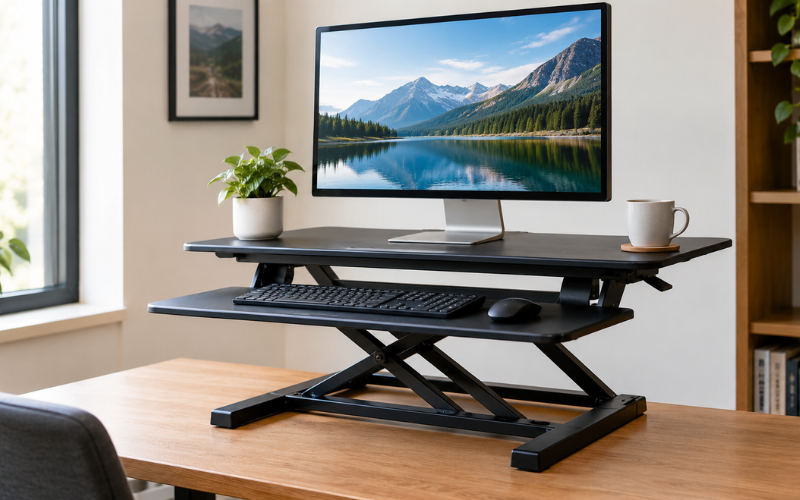
So, what is a riser desk? It is usually a height-adjustable platform that sits on an existing desktop and raises your computer equipment for standing work. Also called a standing desk converter, it lets you move between seated and standing positions while keeping the desk underneath.
The idea sounds straightforward, but the fit matters. A converter may hold your monitors comfortably yet leave too little mouse space. It may reach a useful standing height but sit too high when lowered.
Understanding What a Riser Desk Actually Does
A riser desk raises the equipment you use rather than lifting the entire desk. Your monitor, keyboard, and mouse move upward on the converter, while drawers, desk legs, and items left on the original surface stay where they are.
Most freestanding models have a supporting base, a lifting mechanism, and an upper platform. Many also include a lower keyboard tray. The base rests on your desk, while the mechanism controls the platform’s movement and holds it at the selected height.
This arrangement creates a smaller, adjustable workstation within your existing one. For computer tasks, that may be enough. For drawing, sorting paperwork, or spreading out large documents, the raised surface may feel restrictive.
The name can also cause confusion. A monitor riser normally lifts only the screen, often to a fixed height. It does not necessarily provide a standing-height surface for your hands.
Furniture riser blocks serve another purpose: they go beneath desk legs and raise the whole desk by a fixed amount. They generally do not offer a convenient way to switch between sitting and standing. When shopping, look at what the product actually moves rather than relying on its name alone.
How the Platform Moves Between Sitting and Standing
A basic manual model relies on your effort to move the platform. Depending on the design, you may lift it into preset positions or operate a hand-controlled mechanism. Check whether adjustment is intended to happen with equipment in place.
Assisted-lift models use springs or gas-assisted mechanisms to help support the load. You typically release a handle or lever, guide the platform, and secure it at the desired height. Assistance reduces some effort, but the movement can still feel different depending on the equipment weight and mechanism.
Electric converters use a motor operated by buttons. They reduce the need to lift the platform yourself, although they require power and still have load limits.
The direction of movement matters too. Some converters rise vertically, while others move upward and forward. A forward-moving model can bring the keyboard closer, but it also needs clear space in front of the desk. Certain designs lock into specific positions; others allow finer adjustment.
Common Riser Desk Designs and Their Uses
Single-platform converters place equipment on one raised surface. They can suit a simple arrangement, especially when you do not need many accessories. However, keeping the screen and keyboard on the same level may limit how comfortably you can position each one.
Two-tier designs separate the upper display surface from a lower keyboard and mouse tray. This creates a height difference between your hands and screen. Some models offer additional adjustments, while others keep that spacing fixed. Check the actual design rather than assuming every two-tier converter adjusts in the same way.
Compact converters are intended for smaller work areas. Their narrower platforms can help preserve some desktop space, but the trade-off may be less room for a full-size keyboard, mouse, or notebook. A product can fit on the desk and still feel cramped during use.
Larger models provide more room for multiple screens and wider equipment arrangements. They also add weight and occupy more of the original desktop.
Think about the activities you perform together. If you regularly type while referring to a paper document, you need room for both at standing height. Choosing only around monitor size can overlook the rest of your routine.
Riser Desk vs. Full Standing Desk: The Practical Differences
The main difference is how much of the workspace moves. A riser desk lifts a platform above an existing surface. A full height-adjustable standing desk raises and lowers the desktop itself.
With a full standing desk, your keyboard, documents, speakers, and other desktop items can remain on one continuous surface as it moves. A converter creates separate raised and fixed areas. That works well for some computer setups, but reaching down repeatedly for materials can interrupt the task.
Seated height is another meaningful difference. A converter adds material above your current desktop, even when fully lowered. If that desk already places your keyboard too high, the converter may increase the mismatch. A full standing desk may offer a lower working position, depending on its adjustment range.
The space underneath also stays unchanged with a converter. It cannot remove a drawer that limits knee room or make a shallow desk deeper.
Setup and portability vary. Some converters arrive assembled, while others need a tray or accessories attached. Full standing desks commonly require more installation. A converter may be easier to relocate, but larger units can still be awkward to carry.
Converters often cost less than replacing a desk, although prices overlap. Compare the complete setup, including any accessories you need. Keeping a sturdy, well-sized desk can make sense; keeping one that already fits poorly may limit the improvement.
Benefits and Limitations in Everyday Use
The clearest benefit of a riser desk is flexibility. It adds another working position without requiring you to replace furniture that otherwise suits your space.
For someone who wants to stand during a short meeting or a routine computer task, an easy-to-adjust converter can make that change convenient. It may also suit an office where replacing the existing desk is impractical.
However, the converter takes up space. Its base can occupy an area previously used for writing, and the keyboard tray may extend toward your chair. Objects left behind or beneath the platform can become difficult to reach.
Stability deserves attention as well. A poorly matched or lightly built setup may move while you type, particularly at greater heights. The underlying desk also affects the result: a solid converter cannot fully compensate for an unstable table.
Adjustment effort is another everyday consideration. If raising the platform feels awkward, you may avoid changing positions. Handles, lifting direction, and equipment weight all influence how practical it feels.
A riser also does not guarantee comfort simply because you can stand. Screen position, keyboard height, reach, and the time you spend in one position still matter. Treat it as an adjustable piece of furniture, without expecting it to deliver guaranteed pain relief, weight loss, or better productivity.
Will a Riser Desk Fit Your Desk and Equipment?
Start with your existing desk. Measure its usable width and depth, accounting for anything that must remain in place. Then compare those measurements with the converter’s base dimensions and its space requirements throughout the lifting movement.
The platform width and the base footprint are not always identical. The desk must properly support the converter’s base, following the manufacturer’s instructions. A model that moves forward also needs room beyond its lowered position.
Check the desk’s condition and load capacity. It must carry the converter itself, the equipment on it, and anything else you leave on the desktop. An uncertain or damaged surface should not be treated as suitable simply because the converter physically fits.
Next, check equipment weight against the converter’s stated capacity. Include monitors, stands, laptops, and accessories. If the keyboard tray has a separate limit, follow that too. A monitor arm also needs an approved mounting location; an available edge does not automatically mean it can accept a clamp.
Height specifications require careful reading. Establish whether a measurement refers to the upper platform or keyboard tray, and whether it is measured from the desktop. Your existing desk height contributes to the final working height.
Consider your actual hand space. A keyboard may fit while leaving too little room to move the mouse naturally. Monitor stands can occupy more depth than expected, pushing screens closer to you.
Laptop users face an additional compromise because the screen and keyboard are connected. Raising the screen can leave the built-in keyboard too high. A separate keyboard and mouse allow more independent placement, but they need space on the converter. Also allow enough cable length for the full movement without pulling connections tight.
Setting Up a Riser Desk for Comfortable Use
Begin with the manufacturer’s assembly and placement instructions. Position the base on a stable surface, attach any required parts, and check the lifting path before arranging equipment. Keep fingers and loose objects away from moving joints.
Set the keyboard position around your hands and arms, rather than raising everything until the screen looks right. Your shoulders should feel relaxed, with your elbows close to your body and your wrists reasonably straight. Keep the mouse beside the keyboard so you can use it without repeatedly reaching outward.
Position the monitor directly in front of your main working position. The top of the screen should generally be at or slightly below eye level, with text readable without leaning forward. Individual needs can vary, particularly with some types of glasses. Adjust text size if small lettering makes you move closer.
Check the arrangement while seated and again while standing. A setup that works in one position may need further adjustment in the other. When seated, allow room for your legs and keep your feet supported. If you raise the chair to reach the keyboard, check whether you also need a footrest.
Move the converter through its range slowly and watch the cables. Power leads and display cables should have enough slack, without hanging where the mechanism could catch them. Check for nearby shelves, walls, and equipment that could obstruct movement.
Once the setup is ready, use its adjustment as part of a varied routine. Change position when appropriate and take brief movement breaks away from the workstation. Alternating activities and positions is more useful than treating standing as something you must maintain all day.
Common Questions About Riser Desks
Can a riser desk hold two monitors?
Some models are designed for two monitors, but the number of screens alone does not establish compatibility. Check their combined weight, stand dimensions, and the platform’s usable width and depth.
Two screens with wide stands may need more space than expected. If you plan to use a monitor arm, confirm that the converter supports that mounting method and include the arm’s weight in your calculations. The arrangement should remain within all stated limits.
Can you use one on a small desk?
Yes, provided the desk supports the base and leaves enough clearance for adjustment. A compact converter may fit, but you still need room to position your hands, view the screen, and move your chair.
Measure the raised position as well as the lowered one. A converter that travels forward can occupy space beyond the desk’s front edge during use. Check that this movement will not crowd a walkway or push you too far back into the room.
Does a riser desk need electricity?
Manual and assisted-lift converters generally do not need electricity for height adjustment. Electric models use a powered motor, so their power requirements should be checked before purchase.
Your computer equipment may still require nearby outlets regardless of the lifting system. Cable management matters with every design because the equipment changes height. A non-electric converter does not remove the need to leave suitable slack in monitor and laptop power cables.
Can you work comfortably while it is fully lowered?
That depends on the converter, your desk, and your seated working height. Some models add only a modest amount beneath the keyboard; others leave it noticeably higher.
If your current keyboard already feels too high, adding a converter may make seated use less comfortable. Look at the lowest keyboard position in the specifications. Do not assume a model will suit you simply because the product description says it supports both sitting and standing.
How much assembly does a riser desk require?
Assembly varies by model. Some arrive ready to place on a desk, while others require you to attach a keyboard tray, handles, or additional fittings.
Even a preassembled unit needs careful unpacking and positioning. Check its weight before moving it, and follow any instructions about getting help with lifting. After placement, arrange the equipment, confirm cable clearance, and test the adjustment as directed before settling into normal use.
Conclusion
Understanding what is a riser desk helps you judge whether this type of adjustment would improve your existing workspace. It raises a section of your work area so you can switch between sitting and standing while keeping the desk you already own.
The right fit depends on more than maximum height or monitor capacity. The lowest keyboard position, usable surface space, adjustment effort, and stability all affect daily comfort.
Before changing your setup, measure the desk and equipment and consider how you actually work. A well-matched converter can provide useful flexibility. If the desk underneath is already too high, too small, or unstable, those limitations deserve attention before adding anything on top.