
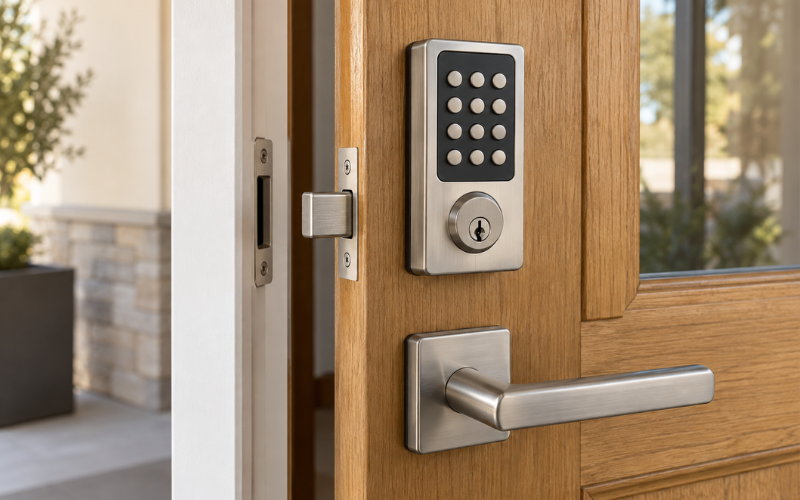
A contemporary SmartCode keypad electronic deadbolt is a Kwikset door lock that lets you unlock your door using a number code. Its contemporary design gives the exterior a clean, modern appearance, while the keypad makes everyday entry more convenient. On models with a key cylinder, you can also use a physical key.
For many households, the appeal is practical. You can come home without searching for keys, give family members their own codes, and provide access to a trusted visitor without handing over a spare key. The design can also coordinate with modern handles and other door hardware.
However, the product name alone does not tell you everything. SmartCode models differ in code capacity, programming steps, locking settings, and connectivity. Before buying, identify the exact model and check whether it fits your door. Security features, installation requirements, and battery care deserve just as much attention as the finish.
Identify the SmartCode Model Before Comparing Features
Look for the number on the box, in the product listing, or on the installation guide. If you already own the lock, check labels on the interior assembly or inside the battery-cover area. Record the complete model information, including any reference to wireless technology.
The SmartCode 260 and SmartCode 913 show why this matters. Kwikset lists the 260 with capacity for 50 user codes. The 913 supports 16 user codes plus a master-code feature, and Kwikset marks the contemporary 913 as discontinued. Their similar styling does not make their specifications interchangeable.
A discontinued model may still appear in retailer listings or already be installed in a home. If you are considering one, check its condition, included parts, return policy, and applicable warranty.
Keep the model number available when looking for instructions. A programming video for another SmartCode lock may show buttons or settings that do not match yours.
Everyday Use: Keypad Entry, Access Codes, and Locking
With a programmed user code, everyday entry is straightforward: enter the code on the exterior keypad, allow the bolt to retract, and open the door. When leaving, models with one-touch locking let you extend the bolt using the lock button.
The SmartCode 260 has an illuminated keypad, while Kwikset describes the 913 as having a backlit, ten-digit keypad with a dedicated lock button. These features can make the buttons easier to locate after dark. Still, consider whether the layout will be comfortable for everyone who uses your door.
Separate codes make shared access easier to manage. For example, a visitor can have a different code from household members, allowing you to remove that visitor’s access later without changing everyone else’s code.
Automatic locking is a separate setting from one-touch locking. Kwikset’s published information for the 260 describes automatic locking after 30 seconds or a selected delay. Check your model’s guide for the available choices and setup procedure.
Choose a delay that suits your routine, and keep an entry method available when stepping outside. Also, remember that automatic locking cannot close a door left open.
Does This SmartCode Model Support Remote Access?
The SmartCode 260 is a standalone lock. Kwikset lists it as requiring no hub, and it should not be purchased with the expectation that you can unlock it remotely through a phone app.
Connected SmartCode models have different requirements. For example, the contemporary SmartCode 914 with Z-Wave technology needs a compatible controller to support remote operation. The connected system provides the route between the lock and remote controls.
Before choosing a connected version, verify the exact lock’s compatibility with your hub or security system. Confirm which app controls it, whether your desired functions are supported, and whether the service involves additional costs.
Think about the task you need to accomplish. Giving someone a code before you leave is different from unlocking the door for an unexpected visitor while away. If remote control is essential, make it a confirmed requirement before purchasing.
Check Whether the Deadbolt Fits Your Door
A contemporary SmartCode keypad electronic deadbolt must match your door’s measurements. Checking them first can prevent installation delays and avoidable returns.
Door thickness is the measurement from the outside face to the inside face. Kwikset lists the standard SmartCode 260 for doors measuring 1⅜ to 1¾ inches thick. Its published specifications also describe an adjustable backset of 2⅜ or 2¾ inches. Backset means the distance from the door edge to the center of the lock hole.
Check the large hole through the door and the smaller hole through its edge against the installation guide. Do not assume an existing deadbolt opening meets every requirement.
Interior clearance matters too. The battery housing needs room beside trim, glass inserts, and nearby hardware. You also need access to remove its cover for maintenance.
Examine how the door closes before replacing the lock. If you must lift, push, or pull it to turn the existing deadbolt, address that alignment problem first.
Finally, check the space between the deadbolt and your handle or handleset. The new lock should fit without crowding the handle, covering old holes unexpectedly, or interfering with normal operation.
Security Features and Backup Key Access
Security starts with the exact model’s specifications. Kwikset lists both the SmartCode 260 and contemporary 913 as Grade 2 locks. This is a tested hardware classification; it does not mean the complete doorway is protected against every possible entry method.
Look at the whole entrance. A damaged frame, loose strike plate, or poorly fitted bolt can undermine the usefulness of a replacement lock. The strike plate is the metal plate on the frame that receives the bolt.
SmartKey rekeying is another feature to check. On supported models, it allows the key cylinder to be changed to accept a compatible key using the prescribed procedure. Kwikset identifies KW1 keyway compatibility for the models discussed here. This concerns the physical key cylinder; keypad codes are managed separately.
A backup key provides another entry method if the electronic function becomes unavailable. Test it after installation and keep it somewhere accessible to an authorized person.
Contemporary Design and Finish Options
The contemporary design usually appeals to buyers who prefer simple lines and a compact exterior keypad. It can work well with a straight lever, a modern handleset, or a front door with clean detailing.
Kwikset lists the contemporary SmartCode 260 in satin nickel, polished chrome, and matte black. Availability depends on the model and finish you select.
Consider how the finish relates to hardware you plan to keep. A new matte black deadbolt above a polished chrome handle creates a visible contrast. That may suit your door, but it should be a deliberate choice.
Product photos also deserve a closer look. Exterior views may receive most of the attention, yet the interior assembly remains visible inside your home. Check both sides before deciding.
Measure rather than relying on photos alone. A lock that looks small against a wide display door can appear more prominent on a narrow door. Compare its dimensions with the available space and existing hardware marks.
Installation and First-Time Setup
Begin by reading the installation guide for your exact model. Confirm that the package contains the required latch, mounting pieces, screws, strike plate, and keys.
Kwikset’s published SmartCode 260 information describes replacement installation using a Phillips screwdriver without hard wiring. However, an existing door may need preparation or alignment work before the lock can operate correctly.
Keep the door open during installation and initial testing. This gives you access to both sides and reduces the chance of locking yourself out.
Follow the guide’s assembly order. Use the correct screws, keep the connecting cable clear of moving parts, and avoid forcing components together. If the interior turnpiece becomes difficult to move, investigate before continuing.
Some setup procedures teach the lock which direction the bolt should move. Kwikset calls this door handing or rehanding. Its 260 support guidance identifies this as an important part of correcting certain installation problems.
Test the interior turnpiece, physical key, and keypad with the door open. Then close the door and repeat the checks. A lock that works smoothly while open but struggles while closed needs an alignment check before normal use.
Programming, Changing, and Removing Access Codes
Programming should follow the instructions for your model. SmartCode locks do not all use the same button sequence, so avoid applying a general online tutorial without checking its model number.
Where available, a programming or master code helps control changes to the stored user codes. Check its purpose in your manual rather than assuming it also works as an everyday entry code.
Choose codes that are easy for authorized users to remember without being obvious to others. Avoid simple sequences or publicly known numbers, such as your street address.
Separate household and visitor codes can reduce disruption when access changes. If a visitor no longer needs entry, remove that individual code and test the change while the door remains open.
Be careful about deleting all codes or performing a factory reset. Resetting can remove saved information and require setup to be repeated.
When taking over an existing lock, review both entry methods. Changing keypad codes does not change which physical keys operate the cylinder. Likewise, rekeying the cylinder does not remove stored user codes.
Battery Replacement and Routine Care
The batteries power the keypad and motor, so their condition affects everyday operation. Kwikset specifies four AA batteries for the SmartCode 260 and 913, while the 260 sell sheet specifies alkaline cells. Follow the battery requirements in your own model’s guide.
Use a fresh set and check the marked battery orientation. Avoid mixing old and new batteries or different battery types.
Learn how your lock signals low power. Depending on the model, warnings may involve lights, sounds, or messages through a connected system. Identify the correct warning in the manual so you can respond before keypad access stops working.
If the batteries run out on a model with a functioning key cylinder, use the backup key to enter and replace them. The interior turnpiece provides manual operation from inside.
Check bolt movement during routine maintenance. If it scrapes against the strike plate or needs repeated attempts to lock, investigate the fit. Replacing batteries alone will not correct a mechanical obstruction.
Common Problems With the Keypad and Deadbolt
When the keypad does not respond, begin with the simplest checks. Confirm that the batteries are fresh, correctly fitted, and making contact. If the problem began during installation, review the cable connection using the model’s guide.
A rejected code does not always indicate a broken lock. Confirm that you are entering a stored user code and completing any required steps. Check the manual’s explanation of the lights or beeps rather than guessing what they mean.
For a bolt that jams, compare operation with the door open and closed. Smooth movement while open suggests that the door and frame need closer inspection. Check whether the bolt meets the strike opening correctly and whether anything blocks its full travel.
Kwikset’s 260 support guidance connects several symptoms, including programming trouble, bolt movement problems, and an unresponsive keypad, with possible installation issues. It recommends checking assembly, power, door direction, and alignment.
Frequent battery replacement also deserves investigation. Look for repeated locking attempts or resistance. On connected models, communication settings may need attention as well.
If basic checks do not resolve the issue, contact model-specific support. Have the model number, battery details, observed signals, and open-door test results ready.
Conclusion
A contemporary SmartCode keypad electronic deadbolt can make daily entry and shared access easier, but the right choice depends on the details of your door and routine.
Start with the exact model number. Confirm code capacity, connectivity, door measurements, and backup entry before considering the finish. During installation, check that the bolt moves freely and test every entry method.
For someone who wants simple keypad access, a standalone model may meet the need. Someone who expects remote unlocking must confirm a compatible connected version and system. With those checks completed, you can make a practical decision based on how the lock will actually be used.
FAQs
1. Does a contemporary SmartCode keypad electronic deadbolt need Wi-Fi?
Not necessarily. Standalone models operate using batteries and stored keypad codes. Connected versions have their own requirements, and some use a compatible hub rather than connecting directly to Wi-Fi. Check the exact model and wireless technology before buying.
2. Can I still unlock the door when the batteries die?
On a SmartCode model with a functioning exterior key cylinder, you can use the matching physical key. Keep that key somewhere accessible outside the locked home. Once inside, replace the batteries and check normal operation.
3. How many access codes can I create?
Capacity depends on the model. The SmartCode 260 supports up to 50 user codes, while the 913 supports 16. Check the manual for separate provisions covering programming codes or temporary access.
4. Will it fit the holes from my existing deadbolt?
It may, but you should measure first. Compare door thickness, backset, hole sizes, and available clearance with the exact installation guide. An existing deadbolt does not guarantee that every replacement model will fit without changes.
5. Can I use my existing house key with a SmartCode deadbolt?
A model with SmartKey may be rekeyed to accept a compatible existing key. Compatibility depends on the keyway, so it will not accept every house key. Follow the model’s rekeying instructions or ask a locksmith to confirm the match.