
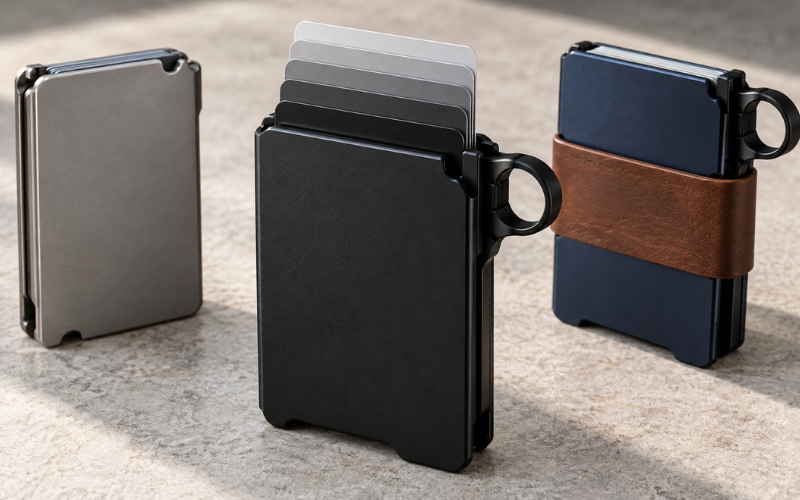
The GRIP6 wallet builder helps shoppers choose a wallet setup around the things they carry every day. The main decisions are the wallet style, whether to choose a loop, and whether to add storage for cash or extra cards. Those choices may look simple on a product page, but they can make a noticeable difference once the wallet is in your pocket.
You can begin at the official GRIP6 wallet selection. The current page displays individual wallets and accessories, with configuration choices available on the wallet product pages. Think of it as selecting a wallet and its available options rather than assuming every part can be freely customized.
The aim is to choose a setup that matches your normal routine. Someone who carries a few cards and rarely uses cash will have different needs from someone who keeps additional cards and bills close at hand. This guide explains how to compare those needs, understand the available options, and review your order before buying.
Understanding the GRIP6 Wallet Builder
The GRIP6 wallet builder starts with choosing an available wallet model. From there, the product page shows the configurations offered for that wallet. For example, the Foxtail listing includes loop and no-loop choices, along with black or brown money-band options and a selection for no add-on.
This matters because a collection page cannot tell you everything about a particular combination. A wallet may appear in the selection while the exact version you want has different availability. Open its full product page and read the choices before deciding.
Separate the wallet itself from any optional storage accessory. A product photo may show a complete setup, but the image alone does not establish what your order includes. The selected options and cart description should make that clear.
The word “builder” can also create expectations of unlimited customization. Work with the options actually shown on the current listing. If you want a different part, color combination, or attachment that is not listed, ask GRIP6 whether it is available rather than assuming it can be added later.
A useful starting point is to decide what the wallet needs to do. Once you know your storage and handling requirements, the appearance choices become much easier to narrow down.
Start With the Cards and Cash You Carry
Empty your current wallet before choosing a configuration. Look at what you use regularly, what you need occasionally, and what has simply stayed there out of habit. Old receipts, expired cards, and duplicates can make your storage needs seem larger than they are.
Count your essential cards individually. A driver’s license, debit card, two credit cards, and an insurance card already make five. Add a work access card or another everyday essential, and your requirements change.
GRIP6 describes the main card mechanism as holding approximately five to six cards. Squeezing the lever raises them for access. Treat that stated capacity as a starting point, and confirm suitability if your cards are unusually thick or have raised lettering.
Avoid choosing a wallet that only fits your needs after removing something you actually use. A smaller setup should simplify your routine. It should not mean leaving an important card behind or carrying a second holder every day.
Cash needs deserve the same attention. Carrying one emergency bill is different from regularly keeping several bills and receiving change. Think about your usual week rather than the smallest amount you could possibly carry.
Also consider the loaded wallet. Cards, folded bills, and accessories all take up space. A slim empty wallet may feel quite different once filled. If pocket comfort is your priority, judge the complete setup you intend to use.
For example, a person carrying five cards and no cash could begin by considering the wallet alone. Someone carrying the same cards plus regular cash should compare the storage accessories. The useful distinction is what each person needs to reach during the day.
Choosing a Wallet Style and Finish
Once you understand your storage needs, compare the appearance options. The current collection includes styles such as Ninja, Deep Blue, Gunmetal, Foxtail, USA Black Flag, and Forged Carbon Fiber. Availability can change, so use the collection as your starting point and confirm the exact version on its product page.
Choose a finish you expect to enjoy beyond the first week. A quieter color may suit someone who prefers a simple everyday accessory. A brighter finish may appeal to someone who likes their wallet to stand out when placed on a desk or counter.
Product names are useful for browsing, but photographs help you judge the actual appearance. Look at several images rather than relying on one small preview. Screen settings and lighting can affect how a color appears, so allow for some difference between the image and the physical item.
Material choices deserve more attention than color alone. The Forged Carbon Fiber listing presents a different material option, but its page also repeats general wallet copy referring to an aluminum body. If the exact construction matters to your purchase, ask GRIP6 which parts use which material.
That is a practical reason to read beyond the product name. A distinctive finish does not automatically mean a different storage capacity, easier handling, or better pocket comfort.
Set your budget before becoming attached to one style. If a more expensive version leaves less room for an accessory you need, consider which choice will make the bigger difference in daily use. Appearance matters, but it works best alongside a configuration that fits your routine.
Loop or No Loop: Choosing Your Configuration
The loop decision concerns the wallet’s shape and how you expect to handle it. Several current wallet listings offer both loop and no-loop configurations. Check your chosen model because the available selection belongs to that specific product page.
Look closely at the loop in the product images. Notice where it sits, how far it extends, and how the wallet is held in any demonstration. Consider whether that shape looks useful for your hands and habits.
If you often retrieve your wallet from a crowded pocket or bag, the loop may be worth examining more closely. If you prefer a simpler outer shape, the no-loop option may appeal to you. These are preferences to assess, rather than promises that one version will feel better for everyone.
Remember that the loop choice and card-access mechanism are separate considerations. Watch the available demonstration to understand how the cards are released. Then decide whether the loop adds something useful to the way you would hold or retrieve the wallet.
Pocket space also matters. Think about whether your wallet shares a pocket with keys, a phone, or other items. Compare the complete outline of both configurations instead of judging only the central card holder.
Before ordering, verify that the displayed photos and selected option agree. Do not rely on the first gallery image to confirm your choice. The cart should state the configuration you intend to receive.
Money Band and Leather Jacket Options
Cash storage is often the choice that most changes a wallet setup. If you rarely carry bills, an accessory may be unnecessary. If you use cash regularly or need additional cards, compare the money band and leather jacket by how they store your essentials.
GRIP6’s Wingman Money Band uses nylon fibers with a leather cover and is offered in brown or black. The brand describes it as adding space for cash, business cards, or approximately six to eight additional cards. That is accessory storage, separate from the main card holder.
For someone carrying occasional cash, the money band is an option to investigate. Study how bills are folded and positioned in the product images or video. Consider whether retrieving and replacing them would suit the way you pay.
Do not assume that filling every available space will preserve the same pocket feel. Extra cards and cash add thickness regardless of the accessory’s empty profile. Choose around your normal load rather than its largest advertised capacity.
The Wallet Leather Jacket is a sleeve that slips over the GRIP6 wallet. Its dedicated listing describes extra storage for cards and cash, a softer outer feel, and a cutout for access. Brown and black options are shown.
This makes the jacket worth comparing if you prefer a leather exterior or want its storage arrangement. Look carefully at where items sit and how much of them remains accessible. Imagine using it with your usual cards and bills, rather than simply choosing the appearance you like most.
Confirm compatibility before buying multiple accessories. Accessories intended for the same wallet are not automatically designed to work together. Ask whether your selected money band and jacket can be used at the same time, especially if you already own an earlier wallet version.
Finally, establish what is included. An accessory selected on a wallet page and an accessory purchased separately should both appear clearly in your order. Check that you have not added the same item twice.
How to Configure Your GRIP6 Wallet
Begin by opening the current wallet collection and choosing a style to examine. If you are still comparing options, open a few product pages so you can review their details without repeatedly returning to the collection.
Read the listing before selecting add-ons. Confirm the wallet’s stated capacity, inspect the available photos, and watch any demonstration that helps explain handling. This gives you a clearer basis for choosing than the product name alone.
Next, select the loop configuration you want. Check the option label carefully, especially if you have been switching between versions while comparing prices or images. A previously selected choice may remain active.
Choose a listed money-band option if it serves your needs. If you want the wallet without that accessory, select the option for no add-on where available. Read any price change as part of the configuration rather than assuming the first amount shown covers every version.
If you want a leather jacket or another separately listed accessory, review its own page. Confirm that it fits the wallet you are buying and choose its color. Keep track of which items belong to the wallet configuration and which have been added separately.
Before adding the wallet to your cart, pause and compare the setup with your everyday essentials. You should be able to explain why each option is there. That small check helps prevent choosing extra storage simply because it is offered.
Review the cart after adding everything. Confirm the wallet model, loop choice, accessory color, quantity, and item prices. If the description does not clearly identify your configuration, resolve that uncertainty before placing the order.
Reviewing the Total Cost Before Ordering
The first price you see may not represent the final setup. Wallet style, selected accessories, discounts, and delivery costs can affect the total. Compare prices after choosing equivalent configurations.
For instance, a wallet shown without an accessory should not be compared directly with another version that includes a money band. Make the selections match your needs first, then assess the difference in cost.
At the time of checking, the collection listed the Wingman Money Band separately at $19.99 and the Wallet Leather Jacket at $29.99. These are current displayed examples rather than fixed prices; verify the amount shown for your order.
Review shipping charges and applicable taxes at checkout. If you are ordering internationally, also check whether import charges may be due separately. Keep the delivery estimate in mind if the wallet is intended as a gift or needed before a trip.
Return terms deserve a careful read because they help you understand what happens if the loaded wallet does not suit you. GRIP6’s dedicated warranty page currently advertises a 100-day trial with a refund or exchange and free US return shipping. Some product descriptions still mention 60 days, so consult the dedicated policy and ask the company to clarify any conflict.
The same policy page describes lifetime replacement coverage with shipping and handling charges. It also lists exclusions after the trial period, including scratches, surface aging, and loss or theft. A lifetime warranty therefore should not be read as free replacement for every possible situation.
Keep your order confirmation and the product details relevant to your purchase. If you later need support, having the model and selected configuration available makes it easier to explain the issue.
Common GRIP6 Wallet Builder Questions
Where can I find the GRIP6 wallet builder?
Start with the official GRIP6 wallet collection. It displays the current wallets and accessories. Open an individual wallet listing to see its configuration choices and product details. Older links or search results may describe a different shopping layout, so use the current official listing to confirm what you can order.
Can I order a GRIP6 wallet without a loop?
Yes, checked listings such as the Foxtail wallet include a no-loop option. Select it on the product page and confirm that the cart reflects your choice. Availability may differ between models or configurations, so check your preferred wallet rather than assuming every listing offers the same selection.
Which option should I consider for carrying cash?
Compare the Wingman Money Band and Wallet Leather Jacket. Both are described as providing cash storage, but their layouts differ. Review the images and demonstrations to decide how you prefer to store and retrieve bills. The amount of cash you normally carry and the pocket space you can spare should guide the choice.
Can I buy accessories separately?
Yes. The money band and leather jacket have separate product listings. This allows you to consider adding storage later rather than selecting every accessory with the wallet. Before purchasing for an existing wallet, confirm compatibility with your particular model and check whether the accessory is intended to replace another attachment.
What should I check if my preferred configuration is unavailable?
Check whether the unavailable part is the wallet style, loop version, or accessory color. Another combination may meet the same practical needs. If the missing feature matters to you, contact GRIP6 about availability instead of buying a substitute you already expect to find inconvenient. Only rely on a restock estimate that the company actually provides.
Conclusion
The most useful GRIP6 wallet builder setup begins with an honest count of your everyday cards and cash. From there, choose a style you like, assess the loop configuration, and add storage only when it serves a clear purpose.
Take time to review the complete order, including accessory compatibility, the loaded wallet’s likely bulk, and the final cost. Check the current return terms as well, particularly where different pages show different information.