
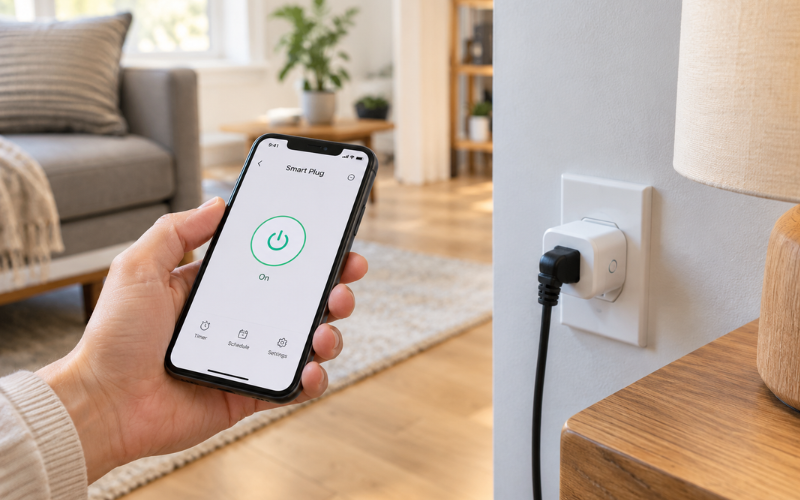
A smart plug is a small device that fits between a wall outlet and an electrical appliance. It lets you control the power going to that appliance through a phone app, a schedule, or a compatible voice assistant. You can add convenient on/off control without replacing the device you already own.
If you have been wondering what is a smart plug and wahether you need one, think about a lamp with a switch behind the sofa. A smart plug could let you turn it off from your phone or schedule it to come on each evening.
However, controlling electricity is different from controlling everything an appliance does. A smart plug cannot automatically adjust an ordinary fan’s speed or choose a washing machine cycle.
Understanding these limits helps you decide where a smart plug would be useful. The best starting point is a simple, compatible device and a specific task you want to make easier.
How a Smart Plug Works
The connection is straightforward: the smart plug goes into the wall outlet, and the appliance plugs into the smart plug. An internal switch allows or stops electricity flowing to the connected device.
During setup, you connect the plug to a compatible app or smart home system. Many models connect directly to your home Wi-Fi. Others communicate through a separate hub or another supported connection. The exact requirements depend on the model.
Once connected, the plug receives instructions to turn its outlet on or off. Depending on its features, those instructions might come from your phone, a saved schedule, or an automation.
The connected appliance still behaves according to its own controls. For example, a lamp with its physical switch left on will usually light up when the smart plug supplies electricity. If you turn the lamp’s switch off, the smart plug cannot override it.
This distinction matters when choosing appliances. A smart plug controls whether power is available; the appliance determines what happens when that power arrives.
The Main Features of a Smart Plug
App-based control is one of the main reasons people use smart plugs. It allows you to switch a connected device on or off without reaching the outlet. Supported remote access can also let you check and change the plug’s status while away from home.
Timers and schedules offer different ways to automate that control. A timer might switch a lamp off after an hour, while a schedule could turn it on at the same time every evening. Some models also support sunrise or sunset schedules.
Automatic routines connect the plug to other actions. For example, a bedtime routine might turn off several compatible lights together. Routines triggered by motion, location, or other conditions require the appropriate devices, permissions, and platform support.
Voice control adds another option. With a compatible assistant and a connected account or platform, you can ask for a named plug to turn on or off. Giving it a clear name, such as “reading lamp,” makes commands easier to use. Google’s guidance confirms that supported plugs can respond to these basic voice commands.
Some models include energy monitoring. This can show current power use, energy consumed over time, or estimated running costs. Check the specifications carefully because these features are not included in every smart plug.
Everyday Uses for a Smart Plug
Lamps are a practical starting point because their behavior is easy to understand. A compatible table lamp can follow an evening schedule or turn off automatically at bedtime. Decorative lights can work similarly, provided their electrical requirements match the plug.
A simple fan may also be suitable if it has a mechanical switch and resumes running when power returns. You would normally choose its speed using the fan’s own controls, then use the smart plug for power control. A fan with electronic buttons may respond differently.
Selected entertainment or desk accessories can be switched off when they are not needed. However, check whether they require a shutdown process or continuous power for updates, recordings, or other functions. Cutting electricity is not always the same as turning a device off properly.
The most useful question is: “What does this appliance do when electricity comes back?” Some devices restart immediately, while others remain in standby until someone presses a button.
Check the manual before testing that behavior. For a simple lamp, a supervised test is straightforward. For equipment with heating elements, motors, or sensitive electronics, follow its specific instructions.
What a Smart Plug Cannot Do
A smart plug does not give an ordinary appliance a full set of smart features. It cannot change a basic fan’s speed, select a coffee strength, or adjust a lamp’s color. Those functions require controls built into the appliance or another compatible device.
An ordinary on/off smart plug also cannot dim a lamp. Dimming requires equipment specifically designed for that purpose, along with a compatible bulb and lamp.
Devices with electronic start buttons present another limitation. A smart plug may restore electricity to a coffee maker or air purifier, but the appliance might still wait for someone to press its power button. A remote command cannot physically press that button.
Automation does not make an appliance safe to leave unattended. If its instructions require supervision, adding a timer or phone control does not remove that requirement.
Finally, a smart plug cannot guarantee a lower electricity bill. It may help reduce unnecessary operating time, but savings depend on what you connect and how you use it. If the appliance already uses very little electricity when idle, the financial benefit may be small.
Smart Plug Compatibility: What to Check
Start with the electrical connection. The smart plug must match your outlet type and the voltage used in your home. An imported model is not automatically suitable just because an adapter allows it to fit.
Next, check the maximum electrical load and the types of appliances the manufacturer supports. A general power rating may not cover every situation. Appliances with motors can have different requirements from simple lighting, including a brief increase in demand when starting. Manufacturer guidance may specify separate limits for different load types.
Check the network requirements as well. Many Wi-Fi smart plugs use the 2.4 GHz band, so confirm that your router provides the connection your chosen model needs. Hub-based products require a compatible hub, while other models may depend on additional smart home equipment.
If voice control matters, verify compatibility with the platform you already use. Do not assume that every plug works with every assistant or that all features transfer between apps.
Physical size deserves attention too. A bulky plug may cover a neighboring outlet or fit poorly behind furniture. Measure the available space, including room for the appliance’s plug and cord.
Setting Up and Using a Smart Plug
Before installation, read the instructions for both the smart plug and the appliance. Confirm that the intended use is supported and that neither product has damage, loose connections, or signs of overheating.
Plug the smart plug into a suitable wall outlet and follow the manufacturer’s setup process. This usually involves installing an app, adding the device, and connecting it to the required network or smart home system. Some products use a setup code or nearby wireless connection to simplify pairing.
Once connected, give the plug a name that describes its purpose. “Bedroom lamp” is easier to recognize than a default product number, especially if you later add more devices.
Connect a suitable appliance and test on/off control while you are nearby. Confirm that the appliance behaves as expected when power returns. Where provided, test the smart plug’s physical button so household members know how to operate it without a phone.
Create one simple schedule first. For example, set a lamp to turn off shortly after your usual bedtime. Check the selected days, time zone, and any automatic time settings.
Observe the first scheduled action before adding more routines. If something does not work, check the appliance’s own switch, the plug’s connection, and the schedule settings before resetting everything.
Safety, Privacy, and Connection Limits
A smart plug is an electrical accessory, so correct use matters more than the convenience of its app. Stay within the manufacturer’s ratings and restrictions, and never treat overload protection as permission to connect an unsuitable device.
High-power heating appliances need particular care. Portable space heaters are generally intended to plug directly into a wall outlet, and local fire-service guidance advises switching them off when leaving the room or going to bed. A consumer smart plug should not be used to bypass these precautions or an appliance’s instructions.
Choose a model designed for its location. Indoor plugs should not be used outside or in damp areas. Outdoor models still have installation requirements, including protection for connections and limits on weather exposure. A weather-resistant label does not mean the product can sit in standing water.
Stop using a plug if you notice scorching, a burning smell, unusual heat, or a loose fit. Switching it off in an app is also not a substitute for unplugging equipment before cleaning or servicing it.
Privacy depends partly on the product’s app and account. Use a strong, unique password, enable two-step verification where available, and install software updates. Review shared access so only the intended household members can operate your devices.
An internet outage and a power outage are different problems. During an internet outage, remote control may stop working, while some local controls or stored schedules may continue. This varies by product.
After a power outage, a plug may remain off, restore its previous state, or follow a configurable setting. Some schedules may also depend on the device recovering the correct time. Check these behaviors before relying on automation, and avoid using an ordinary smart plug for essential medical equipment or other critical loads.
Does a Smart Plug Save Energy?
A smart plug can save energy when it reduces electricity use that would otherwise continue unnecessarily. Switching a forgotten lamp off overnight is one example. Cutting standby power to suitable electronics is another. The U.S. Department of Energy identifies smart plugs as one way to reduce standby consumption.
However, the amount saved depends on the device. A low-power accessory may offer little opportunity for savings, while equipment left running for several unnecessary hours may offer more.
For a simple example, switching a 10-watt lamp off four hours earlier each day avoids 40 watt-hours of electricity use daily. Over 30 days, that equals 1.2 kilowatt-hours before accounting for the smart plug’s consumption. Multiply that figure by your electricity rate to estimate the value.
The plug itself needs a small amount of electricity to maintain its connection and operate. Its purchase price also matters if your main goal is saving money. Convenience may justify a plug even when the financial return is modest, but the two benefits should be considered separately.
Energy-monitoring models can help you understand actual usage. Compare similar periods and check whether the app shows measured consumption or an estimated cost based on an entered electricity rate.
Avoid disconnecting equipment that needs continuous power simply to chase small savings. A useful schedule should reduce waste without interrupting necessary functions or creating extra work.
Conclusion
So, what is a smart plug? It is a controllable power switch that adds app access, scheduling, and sometimes voice control or energy monitoring to compatible plug-in devices.
Its usefulness comes from matching those features to a real need. Turning a hard-to-reach lamp off, scheduling decorative lighting, or limiting unnecessary operating time can make everyday routines easier.
The important limits remain the same: the appliance must be suitable, the electrical requirements must match, and restoring power must produce the behavior you expect. A smart plug cannot add controls the appliance does not have or make unattended operation safe.
Start with one simple task, check compatibility, and observe how the setup works. That gives you a clearer idea of its value than buying several plugs without a specific purpose.
FAQs
1. Can you use a smart plug without a smart speaker?
Yes. Many smart plugs work through their own app or a compatible smart home app without a speaker. A smart speaker is only needed if you want voice control through that device. Network, account, and hub requirements still depend on the plug you choose.
2. Does a smart plug work without Wi-Fi?
Some models use a hub or another wireless connection instead of Wi-Fi. A Wi-Fi model may retain certain functions when the internet fails, but that is different from having no Wi-Fi network. Physical control and stored schedules vary by model, so check its offline behavior.
3. Can a smart plug turn a television on?
It can restore electricity to a television, but it may not start the screen. Many televisions return to standby and still require their remote control. Check the television’s instructions before regularly cutting its power, especially if it performs maintenance, updates, or other tasks while in standby.
4. Is a smart plug the same as a smart outlet?
They serve a similar purpose, but installation differs. A smart plug is a removable accessory that fits into an existing outlet. A smart outlet replaces the fixed wall receptacle and requires appropriate electrical installation. A plug is usually simpler to move between rooms or take with you when moving.
5. Can several appliances share one smart plug?
Only if the manufacturer explicitly permits the arrangement and all electrical limits are met. A connected power strip does not increase the smart plug’s capacity, and the devices normally switch together. For separate control, a purpose-built smart power strip may be more suitable, subject to its own ratings and instructions.