
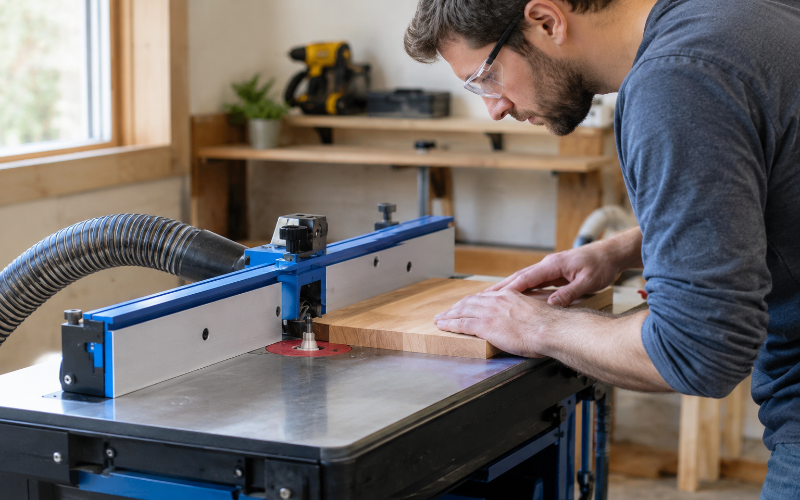
Learning how to use a router table starts with understanding the setup. A router table holds a router beneath a flat surface, with the cutting bit projecting through an opening. Instead of moving the router over the wood, you guide the wood past the bit.
This arrangement is useful for rounding sharp edges, cutting grooves, and creating matching shapes across several pieces. With the right support and settings, it can make repeated cuts easier to manage.
However, a good result depends on more than choosing a bit. The table must be secure, the wood must move in the correct direction, and your hands must stay clear of the cutting area.
Get Familiar With the Router Table’s Main Parts
The tabletop supports the wood as it moves through the cut. Near its center, an insert plate holds the router beneath the surface. This plate should sit level with the surrounding tabletop so the wood does not catch or tip.
The router supplies the power, while the bit determines the shape of the cut. Some bits soften edges; others cut straight channels or stepped recesses.
The fence is the upright guide behind the cutting area. It helps keep straight workpieces on a consistent path. Many fences have adjustable faces that close around the bit while leaving enough clearance for it to rotate.
A bit guard covers the exposed cutting area without preventing the wood from passing underneath. Dust collection helps remove chips that could otherwise collect around the fence and obscure the work.
Before starting, locate the power switch, height adjustment, and any speed control. You should understand how to stop the machine without reaching near the bit.
Prepare the Table and Your Workpiece
Secure the table according to its mounting instructions. A benchtop model should not slide or rock when you apply normal feeding pressure. Check that the router is properly attached and that the insert plate is supported and level.
Clear enough space on both sides for the entire board to travel through the cut. Longer boards need properly positioned supports at tabletop height. Poorly aligned supports can tip the wood or pull it away from the fence.
Inspect your workpiece carefully. Avoid loose knots, splits, embedded metal, and badly twisted stock. The face resting on the table and the edge following the fence should provide stable contact. A board that rocks is difficult to guide consistently.
Wear eye and hearing protection, secure loose clothing, remove dangling jewelry, and tie back long hair. Connect suitable dust extraction and use respiratory protection appropriate to the dust exposure. Keep the switch accessible and remove adjustment tools before starting. These precautions are consistent with Bosch’s router safety guidance.
Finally, decide how you will support and push the wood through the complete cut. If that movement would bring your fingers near the bit, change the setup before proceeding.
Choose and Install the Right Router Bit
Choose the bit according to the cut you need. A roundover bit softens a square edge, while a chamfer bit creates a sloping edge. A straight or suitable spiral bit cuts channels. A rabbeting bit makes a step along an edge, often used to receive another piece.
Check that the bit is suitable for your material and approved for the intended table operation. Its cutting diameter must fit the router and table openings with the required clearance.
The bit’s smooth shaft, called the shank, must match the router’s collet—the sleeve that grips it. Do not force a mismatched bit into place or use improvised adapters.
Disconnect the power before installation. Inspect the bit for damage and clean any buildup from the shank and gripping surfaces. Follow the manufacturer’s insertion depth and tightening procedure; do not assume that pushing the bit fully to the bottom is correct. Bosch’s instructions, for example, specify a minimum insertion depth and clean gripping surfaces.
Set the Bit Height, Fence, and Cutting Speed
Bit height controls how far the cutter projects above the table. For a groove, this determines its depth. For an edge profile, it affects where the shape appears and whether the finished edge includes an unwanted ridge.
Start with a measuring tool or setup block, then confirm the result on scrap. Measurements provide a starting point, but the test cut shows what the setup actually produces.
Position the fence for the required cut and tighten its locks. Adjust the fence faces close enough to support the work while preserving the clearance required by the equipment instructions. Fit an appropriate insert ring and position the guard. Kreg’s fence guidance recommends the smallest insert opening that accommodates the bit safely.
Choose the cutting speed using the bit manufacturer’s recommendations and the router’s limits. Larger bits generally require lower speeds, so the highest setting is not a universal choice. Kreg also directs users to follow the bit manufacturer’s speed recommendations.
For substantial material removal, plan several lighter passes. The suitable depth depends on the bit, material, and operation; there is no single pass depth that suits every cut.
Understand Feed Direction and Workpiece Control
Feed direction is central to learning how to use a router table safely. For a standard fence-guided operation, with the operator facing the fence, the usual direction is from right to left. Confirm this against your table’s arrows and instructions before cutting.
The wood should move against the cutting action at the contact point. Feeding the other way creates a climb cut, where the cutter can pull the board forward unexpectedly. This can quickly lead to lost control.
Kickback occurs when the cutter catches and throws the workpiece. Wrong feed direction, excessive cutting depth, and unstable support can contribute. During edge routing, never place the board between the fence and an exposed bit positioned in front of it. Bosch specifically warns that this arrangement can wedge the material and cause kickback.
Featherboards use flexible fingers to maintain gentle pressure against the fence or tabletop. Position them according to their instructions, normally before the cutter for a table-mounted featherboard pressing toward the fence. They should allow forward movement without forcing the board into the bit or closing a cut.
Use suitable push blocks to keep your hands away from the cutting area. Short, narrow, or awkward pieces may need a purpose-built holding jig. If you cannot support a piece securely, use a different method.
Make Your First Cut on Scrap Wood
Choose a straightforward practice task, such as a small roundover along the straight edge of a reasonably wide board. Use scrap with the same thickness and, ideally, the same wood species as your project.
With the power disconnected, check the fence locks, bit height, guard, and supports. Plan where your hands and push blocks will move. Make sure the work can pass through without catching on an accessory or losing support.
Keep the wood clear of the bit when starting. Turn on dust extraction, start the router, and let it reach operating speed before beginning the cut.
Guide the board in the correct direction, maintaining controlled contact with both the fence and tabletop. Apply enough pressure to keep it stable without forcing it. Avoid pausing against the cutter, which can leave a mark.
Complete the pass using your planned push-block arrangement. Do not pull the board backward through a spinning cutter. Switch off and wait for the bit to stop before inspecting the result.
Check the profile, surface quality, and dimensions. Disconnect power before making adjustments, then test again. Once the result is correct, use that verified setup on your project piece.
Apply the Setup to Common Router Table Cuts
Roundovers and chamfers are useful starting points because the result is easy to inspect. A roundover creates a curved edge, while a chamfer removes the corner at an angle. Small changes in bit height can noticeably alter either profile.
A rabbet is a stepped recess along an edge. Its width and depth must suit the piece that will fit into it. Test the fit using an actual mating piece rather than relying entirely on a ruler.
Grooves run along the grain, while dados run across it. Both can hold panels or connect parts, but the workpiece needs reliable guidance throughout the cut. A long groove in manageable stock may suit a fence-guided setup. A cross-grain dado may require a suitable sled or other dedicated support.
Do not assume that a large panel is suitable simply because it fits over the table. If its weight makes it difficult to control, a handheld router with a secured guide may be more practical.
For repeated profiles, mark the reference face and edge on each board. Keep the same surfaces against the table and fence so small thickness differences do not create mismatched results.
Fix Burn Marks, Tear-Out, and Uneven Cuts
Burn marks often develop when the bit rubs instead of cutting cleanly. A dirty or dull cutter, excessive speed, or a slow feed can contribute. Taking too much material in one pass can also produce heat and strain the router.
Stop and inspect the setup before changing anything. Clean or replace the bit as needed, check its recommended speed, and try a lighter pass. Simply pushing faster can create a different problem if the cutting load remains too high.
Tear-out happens when wood fibers break away beyond the intended cut. It is common around difficult grain and where a cut exits an unsupported edge. A sharp bit, lighter passes, and a properly secured backing piece can help. Do not reverse the feed direction as an improvised solution.
Chatter appears as repeated ripples or vibration marks. Check the router mounting, bit installation, fence locks, and workpiece support. A long bit projecting farther than necessary can also increase vibration, so follow the specified installation limits.
An uneven profile may indicate that the board lifted or drifted from the fence. Review your support and pressure rather than pressing harder. Stop immediately if you notice unusual vibration, a shifting bit, or a sudden change in sound.
Shut Down and Reset the Table Safely
After the final pass, switch off the router and wait until the bit stops completely. Keep your hands and loose objects away from the cutter while it slows.
Disconnect power before removing the bit, changing settings, or clearing the cutting area. Remember that a recently used bit may be hot.
Remove chips with a brush or vacuum once the machine is isolated from power. Avoid sweeping your fingers around the cutting edges. Clear dust from the fence opening and check that collection hoses are not blocked.
Inspect the bit for damage or buildup before storing it. If you plan to repeat the cut, record the bit used, height setting, fence position, and relevant speed setting.
Keeping a labeled sample can also help you recreate a profile. Treat those notes as starting points, however, and make a fresh test cut whenever you reinstall the bit or change the setup.
Conclusion
Knowing how to use a router table means developing a repeatable routine: secure the equipment, choose a suitable bit, set the cut carefully, and check the result on scrap.
Correct feed direction and reliable workpiece support matter throughout the operation. Light, controlled passes give you time to understand how the wood and cutter behave without demanding too much from either.
Start with simple edge work, inspect each result, and move on to grooves or more involved cuts when you can maintain consistent control. A few careful setup decisions can prevent wasted material and make the finished work more predictable.
FAQs
1. Which direction should you feed wood on a router table?
For a standard fence-guided cut, feed from right to left while facing the fence, subject to your table’s instructions and direction markings. The work should move against the cutter’s action at the contact point. Curved or template-guided work needs its own correct setup and feed path; do not assume every operation follows a straight fence arrangement.
2. Can you use any router in a router table?
No. The router must be suitable for table mounting and compatible with the table’s mounting plate or lift. Check the approved mounting arrangements, access to adjustments, and switching requirements. Some combinations need manufacturer-approved hardware. A router that physically fits beneath the table is not automatically suitable for safe use there.
3. How deep should each router table pass be?
There is no universal depth. The appropriate amount depends on the bit’s diameter and design, the wood, the cut width, and the router’s capacity. Follow the equipment guidance and use lighter passes when removing substantial material. If the router labors, the wood becomes difficult to feed, or vibration increases, stop and reassess the setup.
4. Do you always need a fence when using a router table?
Straight cuts commonly use a fence, but some curved work uses a bearing-guided bit or template with suitable starting support and guarding. That does not mean the wood should be routed without guidance. For a beginner, a properly guarded fence-guided operation is a clearer starting point than shaping an unsupported curved piece.
5. Why does a router table leave a small ridge on an edge?
A ridge can result from an incorrect bit height, an unsuitable fence position, or the board lifting during the pass. Check the intended shape of the bit first, since some profiles deliberately include a step. Disconnect power before adjusting the setup, then make another scrap cut while maintaining stable contact with the table and fence.