
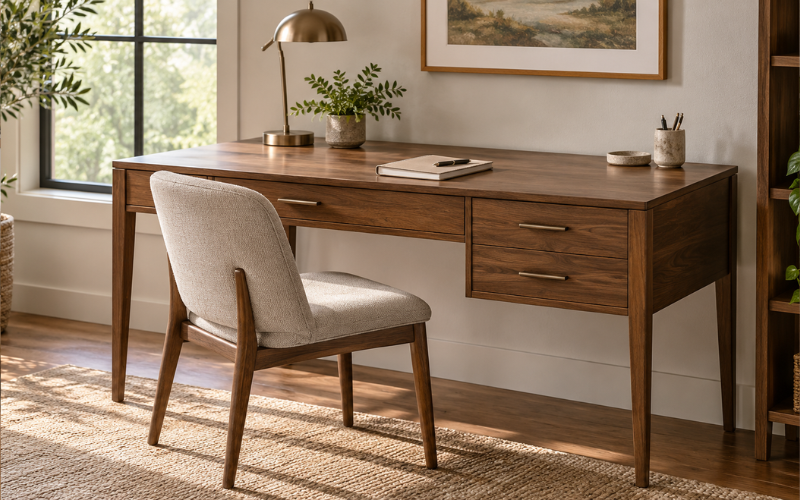
A Bowery Hill contemporary writing desk can refer to several desks with different finishes, shapes, and features. Some versions have a simple wood top and metal frame, while others add drawers, wheels, or a built-in USB connection. That means the product name alone may not tell you exactly what you are buying.
Before choosing one, look closely at the specific listing and model number. Dimensions, materials, storage, and included features can differ from one version to another, even when the titles sound similar. A desk that suits a small writing nook may not offer enough room for a large monitor or several work items.
Design and Finish Options
The Bowery Hill contemporary writing desk name covers a range of looks. Some models pair a wood or wood-look surface with a dark metal frame. Others have a glossy top and a gold-tone base, giving them a more decorative appearance. There are also designs with drawers or other details that make them look more like a compact home-office desk.
Think about how the desk will fit with the furniture already in your room. A rustic oak finish and black frame may sit comfortably beside darker shelving or industrial-style furniture. A white, blue, or pink top with a gold-tone base may suit a brighter bedroom or a more polished dressing area. The finish can change the feel of a room, but it does not determine how much practical workspace the desk provides.
Product photos are useful for judging color and shape, but they can be misleading. Lighting, editing, and screen settings may make a finish look warmer, cooler, or glossier than it appears in person. Read the finish description as well as looking at the images. If a listing says “oak,” for instance, check whether it describes solid wood, veneer, or a printed surface before assuming the desk is made entirely from oak.
Check which finish you have selected before adding the desk to your cart. A product page may group several colors under one listing, and changing the color can also change the model or availability. Confirm that the title, selected finish, photos, and specifications all refer to the same version.
Desk Dimensions and Available Work Surface
The desk’s dimensions help you decide whether it will fit the room and whether its top can hold what you use. Listings for two Bowery Hill styles illustrate why it is important to check the exact version: one finish group is listed at about 42 inches wide by 20 inches deep and 30 inches high, while a rustic oak and black model is listed at 47 inches wide by 23 inches deep and 30 inches high. These measurements are examples, not dimensions for every desk with the same general name.
Width tells you how much room is available from side to side. Depth matters if you plan to use a monitor, keyboard, notebook, or desk lamp at the same time. A shallow surface can work well for writing or a laptop, but may feel crowded when you add a monitor and accessories. Before choosing a desk, measure the items you expect to keep on top and allow space to use them comfortably.
Height affects how the desk works with your chair. A desk around 30 inches high is common in the examples above, but it will not suit every person or chair equally well. Check that your chair can slide under the top and that your legs have enough room. If the desk has a rail, drawer, or support underneath, include that in your check.
Measure the room where the desk will go, including the route needed to bring it in. Leave space to pull the chair back and walk past it. If the desk is going against a wall, account for baseboards, window trim, outlets, and nearby doors. A desk may fit along a wall on paper but still block a drawer, closet, or walkway in practice.
Materials, Frame, and Build
The materials affect the desk’s appearance, weight, cleaning needs, and expected feel in everyday use. Some Bowery Hill listings describe a wooden top with an open metal base. Another version is described as a rustic wood top with a black metal frame and nailhead accents. Other contemporary models can use different materials, so check the specifications for the exact item rather than applying details from one listing to another.
A metal base can give a desk a clear, open look, while a wood or wood-look top brings visual warmth. Pay attention to how the frame is shaped and where the legs sit. Their position can affect stability, knee room, and the way a chair fits beneath the desk. Product photos can help you understand the overall design, but the written specifications are more useful for confirming the stated materials.
Also check the product weight and any stated weight limit. A heavier desk may be less convenient to move once assembled, while a listed weight capacity can help you judge whether it is intended for your planned setup. Do not assume that a desk designed for writing will support every combination of large monitor, printer, books, and equipment. If the listing does not give a weight limit, ask the retailer or manufacturer before placing a particularly heavy load on it.
Look at the edges and finish in the product details. A smooth surface can be easier to wipe clean, while a textured or distressed finish may show marks differently. If the top is glossy, fingerprints and dust may be more noticeable. These details are not necessarily drawbacks; they simply help you choose a surface that suits your habits and tolerance for routine cleaning.
Features That Can Vary by Version
Features are one of the main reasons to compare the full product details. Some Bowery Hill desk listings mention a built-in USB port or outlet, while others describe wheels, a decorative nailhead border, or drawers. Those features do not necessarily come with every desk using the Bowery Hill contemporary writing desk name.
If you are considering a model with a USB connection, check what the listing actually includes. Confirm whether it has USB ports, a power outlet, or both, and see whether the product description explains how the connection is powered. You may still need to place the desk near a wall outlet and use your own charging cable. Treat the built-in connection as a convenience feature, not as a substitute for checking your device’s charging needs.
A model with wheels may be easier to reposition than one with fixed feet. That can help if you sometimes use the desk in different parts of a room, but wheels are only useful if they roll smoothly on your flooring and lock or stay in place as needed. Check the listing for details about the wheels and consider how the desk will behave on carpet, rugs, or uneven floors.
Drawers can keep small supplies close at hand, but they take up space beneath the top. Consider whether you need storage more than open legroom. If you expect to store papers, check the drawers’ size and whether they are suited to your items. A product image may make storage look more substantial than it is, so look for measurements or clear descriptions.
Setting Up the Desk for Writing or Everyday Work
A writing desk works best when the surface has a clear purpose. For handwriting, reading, or occasional laptop use, you may only need room for a notebook, a lamp, and a few supplies. If you plan to work at the desk for longer periods, think about your monitor, keyboard, mouse, charging cables, and anything else that needs to stay within reach.
Arrange the items you use most often so you can work without constantly moving things aside. A desk lamp can help if the room’s lighting is uneven, and a cable organizer may keep cords from crossing the writing area. If your model includes a USB connection, decide where the desk needs to sit in relation to an outlet before assembling it.
The desk itself cannot guarantee a comfortable setup. Pair it with a chair that lets you sit with your feet supported and your shoulders relaxed. Check the height of the chair and the clearance beneath the desk together. If you will use a monitor, place it at a comfortable viewing height and distance; a separate stand may be useful if the screen sits too low.
Keep the intended load in mind. A compact desk may be a good match for a laptop and notebook but less suited to a multi-monitor workstation. If your work setup changes during the day, make sure the surface has enough depth to hold the equipment you need without forcing writing materials to the edge.
Room Fit, Seating, and Placement
A Bowery Hill contemporary writing desk can go in a home office, bedroom, study corner, or shared living space, depending on its size and style. Choose a location where you can pull out the chair and sit down without blocking a doorway or frequently used storage. In a shared room, consider whether the finish and frame will blend with nearby furniture.
Before assembly, mark the desk’s width and depth on the floor with removable tape. This makes it easier to picture the space it will take up and test whether the chair can move freely. Open nearby doors and drawers, and walk through the area as you normally would. A few minutes of measuring can reveal a tight fit that product photos will not show.
Think about light and power access as well. A spot near a window may provide useful daylight, though direct sun can create glare on a screen or affect some finishes over time. A location near an outlet may be more practical if you use a laptop charger, lamp, or built-in desk connection. Avoid running cords across a walkway.
If you expect to move the desk regularly, verify whether the selected version has wheels and whether they suit your floor. If it has fixed legs, plan where it will stay before assembly. Even a desk that is not especially large can be awkward to move once assembled, particularly when it is carrying equipment.
Assembly and Basic Care
Check the assembly information before ordering. Several listed versions require assembly, but the steps, included hardware, and recommended tools may differ. Confirm whether you need to supply tools and whether another person is recommended to help. If the box includes a printed guide, read through it before starting and lay out the parts so you can identify them easily.
Assemble the desk on a clean, level surface and avoid tightening every connection fully until the frame is aligned, if the instructions allow it. Follow the supplied directions for that model rather than relying on a guide for a similar-looking desk. Once assembled, check that the desk sits level and does not wobble before placing equipment on it.
For routine care, use a soft cloth to remove dust and wipe spills promptly. Follow any care instructions supplied with the desk, especially if the top has a glossy coating, veneer, or a special finish. Avoid soaking the surface or using abrasive cleaners unless the manufacturer says they are suitable. If the desk has metal parts, dry them after cleaning to reduce the chance of water marks.
Keep liquids away from electrical connections if your version has a USB port or outlet. Do not overload drawers or the desktop, and check fasteners periodically if the desk is used often or moved. Small checks can help you spot a loose connection or uneven leg before it becomes a nuisance.
What to Check in the Product Specifications
Before purchasing, compare the listing title, selected finish, model number, dimensions, materials, and included features. Retail product pages sometimes group similar items together, so make sure the measurements and feature list apply to the exact color or model you intend to order. A desk with a similar name may have a different top size, frame, or storage layout.
Confirm whether a chair is included; many desk listings sell the desk alone. Check the assembly requirements, delivery details, return policy, and warranty terms as well. These policies can depend on the retailer or marketplace seller, so read the terms shown for your order rather than relying on a general brand description.
If a key detail is missing—such as the weight limit, drawer dimensions, or type of USB connection—contact the seller before buying. Product photos and short descriptions are not always enough to answer those questions. Keeping a copy of the listing or order confirmation can also help you compare what was advertised with what arrives.
Conclusion
The Bowery Hill contemporary writing desk can suit different rooms and routines, but the product name covers more than one design. The most useful choice depends on the actual dimensions, finish, materials, storage, and features of the specific model.
Measure the space, consider what you will keep on the desk, and check that the chair fits comfortably beneath it. Then verify the selected model’s specifications and assembly details before ordering. Taking those steps helps you choose a Bowery Hill contemporary writing desk that fits your room and the way you plan to use it.
FAQs
1. Does every Bowery Hill contemporary writing desk have USB ports?
No. Some listings describe a USB connection, while other models focus on features such as wheels, a metal frame, or drawers. Check the specifications for the exact model you are considering.
2. What size is the Bowery Hill contemporary writing desk?
There is no single size for every version. For example, two listed styles measure about 42 by 20 inches and 47 by 23 inches, respectively. Check the product page for the selected model’s width, depth, and height.
3. Is a chair included with the desk?
A chair may not be included. Check the “items included” section or product description for the specific listing, and confirm before ordering if the photos show a chair.
4. Does the Bowery Hill writing desk require assembly?
Some versions require assembly. Check the listing for assembly instructions, required tools, and whether help is recommended. Follow the guide supplied with your exact model.
5. How should I clean a Bowery Hill desk?
Use a soft cloth and follow the care instructions for the desk’s specific finish. Wipe spills promptly, avoid harsh or abrasive cleaners unless approved by the manufacturer, and keep liquids away from any built-in electrical connections.